My academic-writing workflow
zh / en · machine translated
Only if you have been hurt by Word do you know how bad a piece of software it is. I did not understand this until after I finished my PhD thesis. Briefly, a few problems:
- With many figures, opening the file is a nightmare. If your document has many high-resolution images, every time you open it, the rendering alone takes a long time. Because my PhD thesis was too long and too laggy, I would open the file in advance and do my own things while waiting for it to render, only to come back and find that Word had thrown an error and I had to start over.
- Its compatibility with mathematical formulas is catastrophic. Although you can use the built-in feature to enter formulas in LaTeX syntax, this rendering is extremely unstable. Sometimes I only touched some unimportant part, and all the formulas lost their automatic rendering at once.
- Formatting. I do not have that much time to fiddle with why some of my text inexplicably has its line spacing locked and cannot be adjusted no matter what.
Overleaf and LaTeX
A natural transition is Overleaf. But if you do not need multiple people collaborating online at the same time, it is still a catastrophic product: everything lives in the browser and it cannot be used offline; once the document gets long, compiling is slow, and the free version times out; file and version management is also far less convenient than working locally.
Still, Overleaf made me realise that I could write in LaTeX, and almost all journals accept LaTeX submissions. The problem is that the learning experience of LaTeX is really bad, and I could not foresee how much it would help me once I had learned it, so I gave up after about three days.
Quarto
Finally there is Quarto11 Quarto is an open-source writing and publishing system made by Posit (the company behind RStudio); the same source file can output PDF, Word, HTML and slides., which meets my needs quite well. And because AI is becoming more and more convenient, as long as you “get the gist” of this workflow, the configuration can all be handed over to AI, so I will not go into details here.
Quarto’s process converts .qmd into Markdown, then into LaTeX, and finally produces a PDF. You only need to know Markdown syntax (I believe most people, in order to understand the garbled output LLMs spit out every now and then, have already had deep contact with Markdown). It is plain text, with none of the friction that rich text22 Rich text means that formatting information such as fonts, line spacing and styles is stored in the file together with the text, but you cannot see it. Word’s .docx is essentially a bundle of compressed XML. brings: what is written in the file is what it is.
Running code directly in the document
.qmd lets you insert R chunks directly into Markdown, which enables some interesting features. For example, figures can be drawn on the spot inside your text; below is the example from the Quarto website33 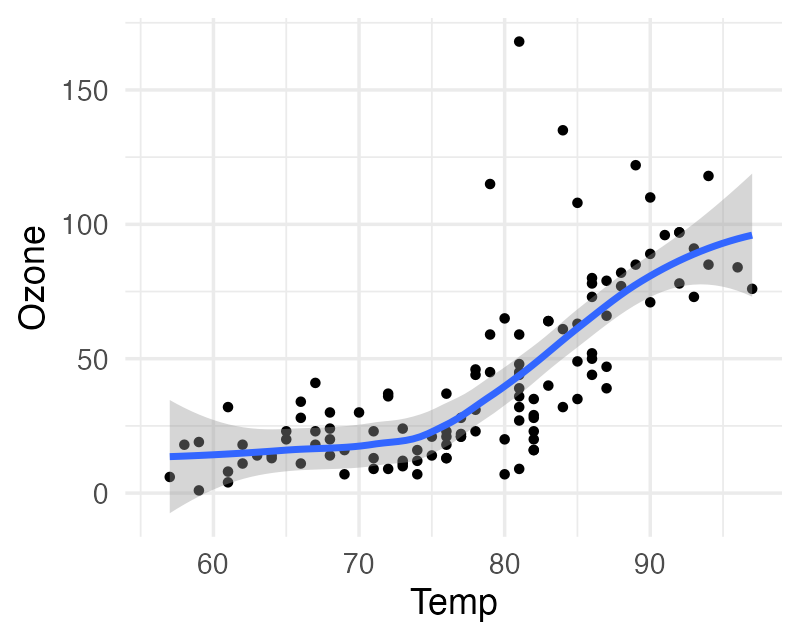 The figure rendered from the code above.:
---
title: "ggplot2 demo"
author: "Norah Jones"
date: "5/22/2021"
format:
  html:
    fig-width: 8
    fig-height: 4
    code-fold: true
---

## Air Quality

@fig-airquality further explores the impact of temperature on ozone level.

```{r}
#| label: fig-airquality
#| fig-cap: "Temperature and ozone level."
#| warning: false

library(ggplot2)
ggplot(airquality, aes(Temp, Ozone)) +
  geom_point() +
  geom_smooth(method = "loess")
```
However, I do not recommend doing this. I manage figures and the code that draws them separately, in figure/ and figure_script/ respectively (see the end of this post). A more useful scenario is putting example code directly in the paper, as I did in this tutorial paper (Zhang & Pampaka, 2026).
Citations
You no longer need to worry about reference managers like Zotero misbehaving in Word. Let it export a .bib file, and then cite directly in the text with citekeys. The source of the sentence above looks roughly like this:
A more useful scenario is putting example code directly in the paper,
as I did in this tutorial paper [@zhang2026bayesian].
Leaving formatting to AI
Used together with AI, adjusting formatting is also a very good experience. To this day I do not know what APA’s specific requirements for tables are, but with apaquarto44 apaquarto is a Quarto extension maintained by W. Joel Schneider, specifically for APA 7th edition formatting: github.com/wjschne/apaquarto. Quarto also has a rich set of extensions supporting various citation styles and journal templates. plus kable for tables, the LLM makes sure I will not be nitpicked by strange reviewers over formatting.
In addition, a finished .qmd file is itself a code file, or a plain-text file, so AI reads and writes it very natively. Many AI tools read Word and PDF files by screenshots or layout recognition: if your point happens to be written at the end of a page, it may well be cut off by the header and footer, and the AI cannot understand it well.
Minimal infra
I recommend managing a paper with a minimal structure like this:
my-paper/
├── data/            # raw and cleaned data
├── script/          # analysis code
├── figure_script/   # code that draws figures
├── figure/          # generated figures
├── paper/           # .qmd manuscript, .bib, journal template
├── model/           # (optional) cached model .rds, no need to rerun every time
└── stan/            # (optional) hand-written Stan models
model/ and stan/ are there because I need to hand-write Stan models and cache model .rds files; if you do not need them, you can leave them out.
Summary
Since I started using this workflow, I have never opened Word again55 Just kidding; for projects with other people there is no way around it, I still have to use it.. The key is not which tool I used (I believe there are many choices similar to Quarto; for example, this website is made with Typst), but that I understood how to manage all the information in a project more efficiently and avoid unnecessary UX friction. Once you learn this, I believe your AI will also become smarter.
References
- Zhang, C., & Pampaka, M. (2026). A reusable Bayesian IRT workflow for instrument validation: A tutorial with a small-sample case study in teacher belief measurement. PsyArXiv. https://doi.org/10.31234/osf.io/aj4hw_v3